2. OLAP and Data Warehousing
OLAP and Data Warehousing
Section titled “OLAP and Data Warehousing”Data teams in companies work with many different kinds of data. Because of this, they need different types of systems. Two of the most important ones are:
- OLTP - Online Transaction Processing
- OLAP - Online Analytical Processing
In simple words, OLTP systems support the daily work of a company: lots of small actions like customers buying something in a shop, updating their address, or changing their password. OLAP systems, on the other hand, are used for analysis: they help to answer questions like how many products were sold last month, which product sells best, or how sales have changed over the past few years.
OLTP - Online Transaction Processing
Section titled “OLTP - Online Transaction Processing”An OLTP system works with transactions - small, clearly defined actions that change data and must be stored correctly. Typical examples are a supermarket sale at the cash desk, an order in an online shop, a reduced stock level in a warehouse, a support ticket that is created or closed, or a user who updates their profile.
All these actions are short, have a clear start and end, and must be processed quickly and reliably. If something goes wrong during the transaction, the whole operation should be rolled back so that the data stays consistent.
Because OLTP systems store very structured data in tables with columns like id, name, price and so on, they usually use relational databases such as PostgreSQL, MySQL or SQL Server. These systems are often used directly by people who work with customers - for example staff in a shop, employees in a bank, customer support agents - or by software that powers a web shop or mobile app.
From a technical point of view, OLTP systems are built to be fast, reliable and able to handle many users at the same time. No one wants to stand at a cash desk and wait for the system to respond, and no one wants an online banking system that sometimes “forgets” a transfer.
Characteristics of OLTP systems
Section titled “Characteristics of OLTP systems”One important property of OLTP systems is high concurrency. Concurrency means that many users work with the system at the same time. Think of all Billa branches in Austria processing sales simultaneously, or thousands of people using their banking app on a Friday afternoon. The system must make sure that all these transactions are saved correctly and do not interfere with each other.
OLTP systems also support real-time processing. When something happens, the change should be visible immediately. If you buy the last PS5 in an online shop, the product should show “out of stock” right after your purchase. If you send money using online banking, your balance should be updated in the app even if the actual transfer between banks is completed later.
Another characteristic is that OLTP systems perform short transactions. Most operations only touch a few rows and are finished in a very short time. A supermarket sale might create one row in a receipts table, a few rows in a receipt_items table and update one row in an inventory table. Each of these steps is simple, but together they must be executed as one consistent transaction.
Because these operations are so frequent, OLTP systems are optimized for quick response times, often in the range of milliseconds. If every click in a mobile app took two seconds, users would quickly become frustrated. For call center employees, slow systems would mean longer calls and unhappy customers. Performance is therefore a central design goal.
Examples of OLTP systems
Section titled “Examples of OLTP systems”Many systems that you use in everyday life are OLTP systems.
POS - Point of Sale
Section titled “POS - Point of Sale”A classic example is a Point-of-Sale (POS) system, the software behind the cash desk in a supermarket. It scans items, calculates totals, applies discounts or vouchers and updates the stock when something is sold. These operations must be fast and robust; if the system is slow or crashes, queues at the cash desk grow and customers get annoyed.
Online Banking
Section titled “Online Banking”Another obvious example is online banking. The app or web portal lets you check your account balance, perform transfers, manage standing orders and view recent transactions. Even if bank transfers between institutions may take one or two days, the transaction itself should appear immediately in your online banking overview. Security and correctness are critical here: the system must ensure that money is neither lost nor created “out of thin air”.
CRM - Customer Relationship Management
Section titled “CRM - Customer Relationship Management”A third example is CRM software (Customer Relationship Management), which companies use to manage customer relationships. Employees add new customers, update contact details, log calls and emails, or create tasks for sales and support teams. Each of these activities is a transaction that changes data and must be stored correctly. Because this happens while someone is actively working with a customer, the system must be responsive and reliable.
In summary, OLTP systems handle the day-to-day operations of a company: selling, booking, updating and changing data. They are optimized for many simultaneous users, very fast responses and correct, reliable storage of every single transaction.
OLAP - Online Analytical Processing
Section titled “OLAP - Online Analytical Processing”Now we turn to the second major type of system:
OLAP = Online Analytical Processing
While OLTP focuses on daily operational work, OLAP is about analysis and understanding what is going on in the business. OLAP systems help to find patterns in data, discover trends such as increasing or decreasing sales and support managers in making strategic decisions.
OLAP systems usually work with large amounts of data collected over longer periods, often months or years. Instead of looking at a single receipt or single bank transfer, they look at all receipts or transfers together and try to answer questions like “Which regions are performing best?” or “Which products are losing popularity?”.
How OLAP looks at data
Section titled “How OLAP looks at data”OLAP often uses a special way of organizing data. Historically, this was described as an “OLAP cube”. Today, many systems are implemented on top of MPP (Massively Parallel Processing) databases, where data is split across many servers that work in parallel to answer large and complex queries faster. The basic idea is still similar: we want to view data from many angles, or dimensions.
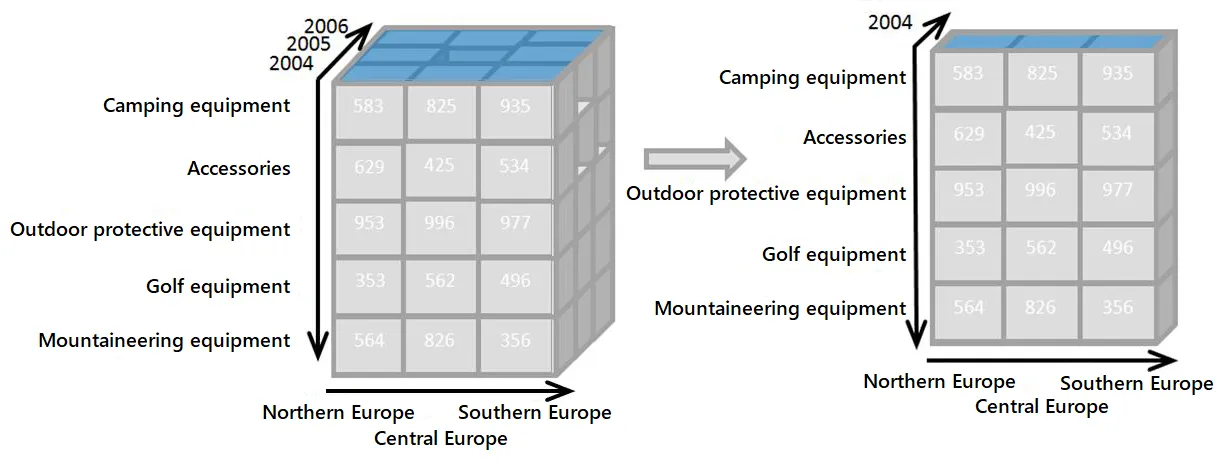
You can imagine an OLAP cube like a three-dimensional cube in math, but with more possible dimensions. One axis might be time (day, month, year), another axis product (which item was sold), and a third axis region (country, city, store). With such a structure, you can select a “slice” of the cube, for example: all sales of Product A in Carinthia in 2024, or the comparison of sales in 2023 versus 2024 for all products.
This way of thinking makes analysis much more flexible. Analysts can quickly filter, group and compare data along different dimensions without writing extremely complicated SQL queries on a fully normalized OLTP schema.
Characteristics of OLAP systems
Section titled “Characteristics of OLAP systems”OLAP systems are designed for complex analysis, not for quick, small transactions. Instead of thousands of tiny writes per second, they run fewer but very heavy read queries that may scan millions or billions of rows.
A key idea is the use of multidimensional data structures. Data is organized around dimensions such as time (day, week, month, year), geography (country, city, store), product (category, brand, item) or customer group (age, segment, etc.). This allows analysts to easily limit data to “only Austria”, group it “by product category” or compare “this year versus last year”.
The queries themselves are often long and complex. Typical OLAP questions might be: “What were our top 10 products in revenue for each month in the last three years?”, “Which regions show the fastest sales growth?” or “How does the average order value change over time for different customer segments?”. On a well-designed OLAP structure, these queries can be expressed more clearly and executed more quickly than on a pure OLTP schema.
Another important characteristic is the focus on historical data analysis. OLAP systems often store data for many years. Time is not just another column, but a central dimension that allows you to compare periods (for example, Q1 2023 versus Q1 2024), see trends over time or recognize seasonal patterns, such as higher sales before Christmas.
Because OLAP systems make it easy to explore data in this way, they are a central component of Business Intelligence (BI). They power dashboards that show key figures (KPIs), periodic reports for management and often serve as the basis for more advanced analyses such as forecasting.
Examples of OLAP systems
Section titled “Examples of OLAP systems”End customers usually do not interact directly with OLAP systems. Instead, they are used by people like analysts, controllers, managers or data scientists.
A central element in many organizations is the data warehouse. A data warehouse is a large, central database that collects data from many different sources: OLTP systems such as web shops, POS systems or CRMs, other internal tools and sometimes even external data like market statistics. The data is stored over a long time and is optimized for querying and analysis, not for fast updates. In simple terms, you can think of a data warehouse as the company’s long-term memory for data.
On top of such a warehouse, companies often build Business Intelligence dashboards. These dashboards show charts, tables and KPIs such as daily sales, number of active users, average order value or customer satisfaction scores. By combining OLAP (for fast, multidimensional queries) with visualization tools (for charts and graphs), people in the company can quickly see what is happening and react.
There are also specialized sales analysis tools that focus on questions like “Which products are most profitable?”, “Which customer segments buy the most?” or “What do we expect to sell next month?”. These tools strongly rely on OLAP techniques in the background.
Skills needed for OLAP work
Section titled “Skills needed for OLAP work”Working effectively with OLAP and data warehouses usually requires:
- solid SQL skills (especially
JOIN,GROUP BY,HAVINGand sometimes window functions), - a basic understanding of data modeling in terms of dimensions and facts (for example a star schema),
- and some experience with dashboards or reporting tools.
For students who already know relational databases, ER diagrams and transactions, OLAP is therefore a logical next step: it uses the same basic tools but applies them to different goals.
Summary
Section titled “Summary”OLTP and OLAP serve very different purposes in a company.
OLTP systems support the daily business: they handle many small, fast and reliable changes to data and must work with high concurrency and very short response times. Typical examples are supermarket POS systems, online banking, CRM tools and web shops.
OLAP systems are designed for analysis. They work with multidimensional views of large, mostly historical data sets and answer complex questions about trends, patterns and performance. They form the basis for data warehouses, BI dashboards and analytical tools that help companies understand and improve their business.
Together, OLTP helps companies run their operations, while OLAP helps them understand and improve those operations over time.