1. Foundations
Foundations of Database Systems
Section titled “Foundations of Database Systems”Development of Databases
Section titled “Development of Databases”Databases are the backbone of many computer applications. Whenever workflows go digital, large amounts of data need to be reliably stored, quickly found, and safely modified. This applies to personnel management, warehouse management, as well as order processing and accounting, but also in computer games. In larger companies, an ERP system (Enterprise Resource Planning) often takes care of this, bundling many business processes and accessing a shared data basis. Databases also play a central role on the web — in online shops, booking systems, social media platforms, or reference works like Wikipedia.
In short: data is generated and processed everywhere — stored, linked, and read.
If data is stored only in simple files (e.g., CSV, text files, or custom formats), typical problems arise:
-
Redundancy: The same information is stored multiple times (e.g., a customer’s address in multiple files). Changes are costly because you have to update multiple places.
-
Inconsistencies: Redundancy quickly leads to contradictions. If an address is only updated in one file, the other copies become outdated.
-
Limited multi-user operation: When a file is being edited, it is often completely locked. Others cannot work with the same data simultaneously — this slows teams down.
-
Data privacy issues: In file systems, it is difficult to control finely who can see or modify which fields. Additional solutions (read locks, encryption) are needed, which are error-prone.
-
Missing data independence: Programs must know the exact file structure. If this structure changes, all programs must be updated. When multiple applications use the same files, each often needs its own data management — maintenance costs explode.
How do database systems solve this better?
-
Central, consistent data basis: All applications access the same, current data. Rules (e.g., “customer number must not appear twice”) are enforced by the DBMS.
-
Concurrent operation (transactions): Multiple people or services can work in parallel without corrupting each other’s data. Changes are either carried out completely or not at all — incomplete states are avoided.
-
Security and roles: You can precisely define who may read, insert, change, or delete — down to the table or even column level.
-
Performance: Indexes allow the DBMS to find data very quickly, even when tables have millions of rows. Queries can be formulated precisely with SQL.
-
Backups and recovery: Data can be backed up regularly and restored in case of problems (e.g., hardware failure).
-
Data independence: The way data is stored is relatively decoupled from the program that accesses it. Structural adjustments (new columns, new tables) are possible without rewriting every involved application.
Examples:
-
Online shop: Tables for products, customers, orders, payments. At checkout, the DBMS checks whether stock is sufficient and briefly locks the record so that two people cannot buy the last item simultaneously.
-
School/HTL: Tables for students, teachers, subjects, timetables, grades. Roles define that teachers may enter grades, while students can only read them.
Database systems (DBS) were developed to solve typical file problems such as redundancies, inconsistencies, and lack of multi-user support. In a DBS, data is stored in a database, and access is exclusively via the database management system (DBMS). Applications no longer address files directly; instead, they submit their queries (e.g., in SQL) to the DBMS. This greatly reduces the tight coupling between data and programs — changes to the data structure are far less likely to break applications.
Components of a DBS
Section titled “Components of a DBS”-
Database: A logically coherent collection of data on a topic/subject area (e.g., “Shop”, “School”).
-
DBMS (Database Management System): The software that manages the data and provides the interface for users and programs.
-
DBS (Database System): A database system is the entirety of the database, database management system, and the applications accessing it.
What does the DBMS do concretely?
-
Central interface: Applications formulate queries (SELECT, INSERT, UPDATE, DELETE — SQL statements). The DBMS translates and executes them efficiently.
-
Concurrent operation (transactions): Multiple users can work in parallel without corrupting each other’s data. Changes are “all or nothing” (atomicity).
-
Consistency & rules: The DBMS enforces constraints (e.g., unique customer numbers, mandatory fields, referential integrity).
-
Access rights & data privacy: Roles and permissions control precisely who may read, insert, change, or delete — down to the table or column level.
-
Performance: Indexes, caching, and optimization ensure that even large amounts of data are found quickly.
-
Fault tolerance & recovery: In case of program or system crashes, transaction logs, backups, and recovery mechanisms help restore data correctly.
-
Central control & monitoring: Monitoring, logging, and a data catalog (metadata) provide transparency and traceability.
Example (simplified):
A web shop saves an order as a transaction: secure the cart, adjust stock, post the payment. If the system crashes in the middle, the DBMS automatically reverses the incomplete changes — a consistent state is maintained.
Properties of Database Management Systems
Section titled “Properties of Database Management Systems”-
In databases, data is stored according to its natural relationships. It is not critical in what form the data is needed by applications. The data in the database represents a section of the real world.
-
Many users can access the data in a database simultaneously. The database management system manages both the data and access to it, and ensures that the same data cannot be edited by multiple users at the same time. Even when multiple applications work with a shared data basis, application programs usually only access a portion of it (a view of the database).
The database management system is the software that manages the databases.
It enables:
- creating databases,
- storing, modifying, and deleting data,
- querying the database,
- managing users, access, and access rights.
To allow application programs and users to access the data in a database, the DBS provides a language concept. In relational DBS, this is usually the database language SQL (Structured Query Language).
History of Databases
Section titled “History of Databases”From file systems to databases: a brief overview:
-
1950s: Magnetic tapes (sequential files) — Data was stored sequentially on tapes. This was inexpensive, but slow: to find a specific record, one often had to “fast-forward” the entire tape.
-
1960s: Magnetic disks (direct access, multiple access) — With hard disks, one could jump directly to the desired location. This made searching and parallel operation significantly faster.
-
1970s (1st generation): Hierarchical data model — Data was organized in tree structures (parent-child relationships). Fast for clear hierarchies, but inflexible for cross-references.
-
1970s: Network model (further development) — Allows many-to-many relationships via links (“sets”). More flexible than hierarchical, but complex in use.
-
1970s/1980s: Relational model (breakthrough in practice) — Data in tables with keys and relationships; queries with SQL. Strong separation of data and applications, high flexibility and data integrity — still the standard in many systems today.
-
In parallel: Column-oriented and document-oriented approaches:
-
Column-oriented: Store data column by column, which speeds up analytical queries across many rows (data warehousing/analytics).
-
Document-oriented: Store flexible documents (e.g., JSON). Good when data schemas change frequently or vary per record.
-
-
Early 1990s: Object-oriented databases — Store objects directly with attributes and methods. Fits well with object-oriented languages, but did not gain broad adoption outside of specialized use cases.
-
Mid-1990s: Object-relational databases — Combine a relational foundation with object-oriented ideas (user-defined types, arrays, JSON/geo types). Goal: the best of both worlds.
-
Since the mid-2000s: NoSQL trend (strongly growing) — Umbrella term for key-value, document, wide-column, and graph databases. Focus on scalability, high availability, and flexible schemas — important for web-scale applications, streaming, and big data scenarios.
Each step responded to the concrete requirements of the time: first faster access, then more flexible models, finally massive scaling and flexibility. Today, one chooses based on use case: relational for strong consistency and structure, NoSQL variants for flexibility and huge data volumes.
Hierarchical Databases
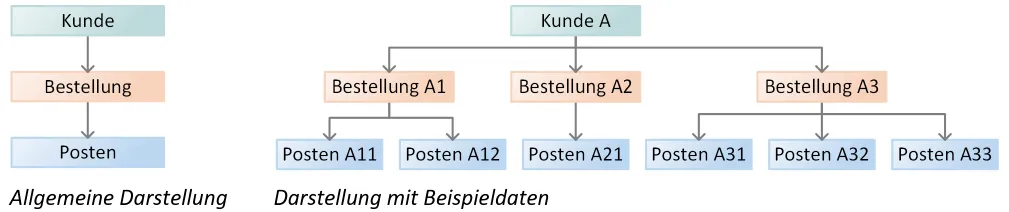
Section titled “Hierarchical Databases”The hierarchical data model was developed to efficiently store records of varying length (i.e., records with a varying number/length of fields). Related information is broken down into uniform groups; each group forms a node in a tree structure. This creates a strictly hierarchical order — from the root node down through parent nodes to child nodes.
Basic principle (parent-child relationship):
-
Each child node has exactly one parent node.
-
A parent node may have multiple children.
-
The tree only exists with its root node; without a root, no structure.
-
The meaning of a record is determined by its path from root to leaf.
Network Model
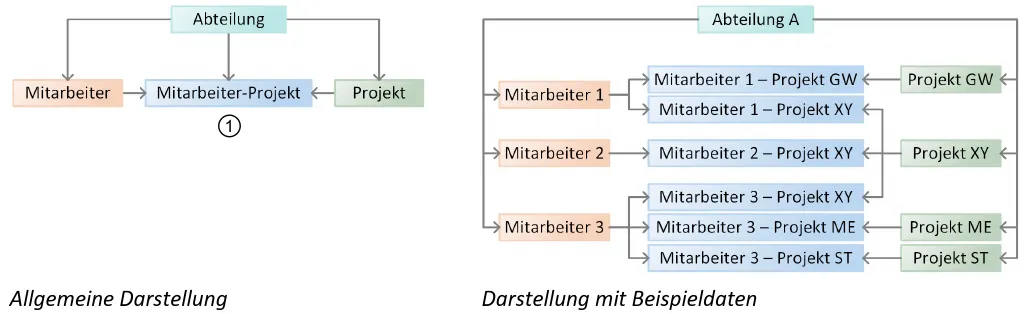
Section titled “Network Model”The network model extends hierarchical thinking: records are stored in uniform groups (record sets) and linked via fixed relationships. These relationships are called sets. Each set connects exactly one owner with many members. However, the same record can belong to multiple sets — this creates not a tree, but a directed graph (a network).
Basic principle (owner-member relationships):
-
A record can have multiple “parents.” Because a record may be a member in multiple sets, many-to-many relationships are possible (often via a small intermediate record).
-
A set is 1:n: one owner, many members. A record can be an owner in one set and a member in other sets simultaneously.
-
No fixed root: There is no single “the” root. You choose a starting record and then follow the links through sets.
-
Meaning through links: What a record “means” is determined by its relationships in the network, not by a single path.
Typical use & access:
- Navigation instead of query language: You move step by step (“follow the pointers”) from a starting record to linked records.
Relational Model
Section titled “Relational Model”Relational databases store data in tables (mathematically: relations). Relational databases are today the most widely used type of database system. The mathematical foundations of relational databases were developed by Edgar F. Codd in the 1970s. In contrast to hierarchical databases and the network model, mathematical considerations form the basis for the relational model.
Rows are called tuples (records), columns attributes (fields). Tables can be linked with each other via relationships — creating an understandable, well-analyzable data model.
Basic principles:
-
Entities & tables: Each table describes an object type (e.g., Student, Course, Order).
-
Primary key: Each row (record, tuple) has a unique key (e.g., id) that identifies it reliably.
-
Foreign key: Relationships between tables are established via references (foreign keys).
Types of relationships:
-
1:1 (one record to exactly one other)
-
1:n (one record to many)
-
n:m (many to many) — implemented via a junction table.
Integrity & rules: Constraints (e.g., NOT NULL, UNIQUE, CHECK) and referential integrity ensure correct, consistent data. Attempts to violate these rules are rejected by the database.
Normalization: Breaking down into sensible tables (1NF, 2NF, 3NF …) reduces redundancy and anomalies. This allows checking how susceptible a database is to inconsistencies and correcting them if necessary.
Modeling & representation:
- ERM (Entity-Relationship Model): Entities (= tables) and their relationships are shown graphically with lines and cardinalities (1, n, m).
Working with data:
-
SQL is the standard (there have been a few other languages in the past that could not establish themselves):
-
DDL (Data Definition Language — create/modify structure),
-
DML (Data Manipulation Language — insert/modify/delete data),
-
DQL (Data Query Language — query data, e.g., SELECT with JOINs).
-
Ad-hoc queries and views allow diverse analyses.

Column-Oriented Databases
Section titled “Column-Oriented Databases”Based on the relational model. Here, however, data is stored column by column rather than row by row. This makes aggregation (SUM, AVG, COUNT) and scans over few columns extremely fast and saves much storage thanks to strong compression. Typical for analytics/OLAP, data warehouses, and log analysis.
Less suitable for very frequent individual updates of complete rows (classic OLTP).
Document-Oriented Databases
Section titled “Document-Oriented Databases”Data exists as documents (usually JSON/BSON) — flexible, without a strict schema. Nested structures fit well with web objects (e.g., an order with line items). You search via fields/indexes and often store “everything that belongs together” in one document. Good when you don’t know exactly in advance which fields will be needed (e.g., user profiles, content management).
Strengths: Fast development, flexible models, good horizontal scaling. Trade-offs: joins are unusual (you embed instead), transactions across multiple documents are limited depending on the system. Typical: MongoDB, CouchDB.
Object-Oriented Databases
Section titled “Object-Oriented Databases”They store objects directly with attributes and methods — including inheritance and references (pointers). This eliminates the “mapping” between the object world and tables. Objects remain identical and encapsulate their behavior.
Advantages: No impedance mismatch, natural for complex models (CAD, simulation, scientific data). Disadvantages: Little standardization, weaker ad-hoc queries than SQL, lower adoption. Examples: ObjectDB and similar.
Object-Relational Databases
Section titled “Object-Relational Databases”The core is relational (tables, SQL), supplemented by object-oriented features: user-defined data types, arrays/JSON, table inheritance, functions/procedures close to the data. You stay with SQL but can model complex structures cleanly.
Good when you need relational thinking plus richer data types (e.g., geodata, JSON). Advantages: strong transactions, integrity + flexibility. Disadvantages: more complex, partly vendor-specific. Typical: PostgreSQL, Oracle.
NoSQL Databases
Section titled “NoSQL Databases”With the explosive growth of the internet, the volume of data and the number of simultaneous accesses in individual databases increased dramatically. Classic relational systems reach their limits here — for example, with extremely high read/write loads or frequent data changes. Additionally, they are heavily schema-bound: changes to large schemas are costly and can be risky. NoSQL databases address these problems by offering flexible (schema-lean/free) models and building in distribution across many servers from the outset (sharding, replication), including deliberate redundancy for fault tolerance and scaling.
Pioneers of this development included Google, Amazon, eBay, and Facebook. The significance of NoSQL is also evident in the fact that widespread relational systems like MariaDB and PostgreSQL now include NoSQL features (e.g., JSON storage, key/value features). The term “NoSQL” appeared at the end of the 1990s as the name of a small database, initially in the sense of “not SQL”. Later it was understood more broadly as “not only SQL”: it is not against SQL, but rather about alternative data models alongside the relational one — partly with concepts that had already been discussed earlier (e.g., document-oriented or column-oriented approaches).
Document-Oriented Databases
Section titled “Document-Oriented Databases”Store data as documents (e.g., JSON). Good for naturally nested structures and rapid development without a rigid schema.
Graph Databases
Section titled “Graph Databases”Ideal when many cross-connections between data need to be managed (e.g., “Who follows whom?” in social networks). Data are nodes, relationships are edges.
Key/Value Databases:
Section titled “Key/Value Databases:”Very simple schema: a key (any string) points to a value (single value, list, or set). Important distinction: storage location — in RAM (very fast) or on external media. Systems of this group are frequently used for caching, session data, or large, distributed workloads.
Learning Outcomes: What you should be able to do after this chapter
Section titled “Learning Outcomes: What you should be able to do after this chapter”After completing this chapter, students should be able to:
- Name: name the central components of a database system (DBMS, database, applications) and key milestones in database history.
- Describe: describe the development from classic file management towards database systems.
- Explain: explain the essential properties and tasks of a DBMS (e.g., data independence, multi-user operation, consistency).
- Compare: contrast data storage in file systems with that in database systems.
- Evaluate: assess for which use cases the deployment of a database system is appropriate.