2. Database Design
Phases of Database Design
Section titled “Phases of Database Design”Views and Data Independence
Section titled “Views and Data Independence”A central goal of a database system (DBS) is data independence. It arises from the separation of physical data storage and management on the one hand, and application programs on the other.
A distinction is made between:
-
Physical data independence: The internal organization of data remains transparent to programs and users. Changes to the physical storage or structure do not require any adjustments to the applications.
-
Logical data independence: The overall logical structure of the database is separate from user-specific views. This allows additional applications and views to be set up on an existing database without affecting existing applications.
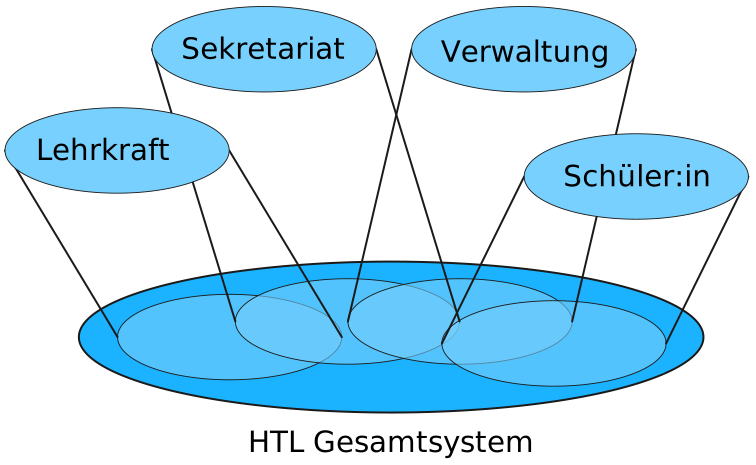
View: A task- or application-specific subset of the database that encompasses exactly the relevant data.
A view is a professional excerpt of the entire database — tailored to a specific task or user group. It shows only the required information in a suitable structure, without exposing the technical details of storage.
A view is a selected section of the database that is relevant for a specific task or role. Often a view also has its own presentation. With views, you focus on what is relevant and hide what is superfluous. Views are therefore an important foundation for logical data independence. Changes to technical storage do not affect the view. Multiple views on the same data basis do not interfere with each other.
Examples (conceptual):
- Teacher view: Students, class, grade overview; no address or payment data.
- Secretariat view: Master data (address, contact, school affiliation); no detailed performance data.
- School administration/cost center: Classes, budget, expenses per project; no personal grade data.
- Student view: Own grades and absences; no data from other persons.
3-Layer Model (ANSI-SPARC, 1978)
Section titled “3-Layer Model (ANSI-SPARC, 1978)”The 3-layer model shows that one and the same dataset can be viewed from different perspectives. It also illustrates the principle of data independence:
-
Physical data independence: Applications and users do not need to know how and where the data is technically stored (file formats, indexes, storage locations).
-
Logical data independence: Applications and users work with a professionally meaningful representation of the data (views), without needing to know the entire overall structure.
In short: programs and people can access and work with data without knowing the details of the technical implementation (storage, internal processes). The model deliberately separates presentation, overall structure, and technical storage.

External Layer (User Views — Professional Excerpts)
Section titled “External Layer (User Views — Professional Excerpts)”- Describes task-related excerpts from the entire dataset for specific roles or applications (e.g., accounting, production, secretariat).
- Contains only the information currently needed in a suitable professional structure.
- May arrange or rename attributes and relationships differently than in the overall schema — as long as the professional meaning is preserved.
- Example (purely conceptual): Accounting uses “Customer”, “Invoice”, “Payment Status”; the stock level of “Item” is not part of the external view.
Conceptual Layer (Logical Overall View)
Section titled “Conceptual Layer (Logical Overall View)”- Contains the company-wide, unified professional model: all relevant objects/entities, their attributes, relationships, and business rules.
- Is formulated as a consistent overall picture of the real world — application-neutral, i.e., not tailored to individual departments.
- Serves as the reference point for all external views: each user view is a subset or projection of this overall view.
Internal Layer (Physical Organization)
Section titled “Internal Layer (Physical Organization)”- Describes the technical storage and access paths: files, pages, indexes, partitions, compression, backup/recovery, etc.
- The goal is efficient and secure access to the data — regardless of how external views are formulated.
- Is derived from the conceptual layer and physically implemented in the database system.
Between the layers there are transformation rules that convert data from one view into the structures of another view.
The Database Design
Section titled “The Database Design”When it becomes clear during software planning that a database is needed to manage the information, database design begins. Step by step, it is determined:
- what data is actually needed,
- whether additional applications should work with the same or additional data,
- and how all of this is organized sensibly.
Three questions are particularly important:
-
Logical structure (professional viewpoints):
Which views of the dataset are needed (e.g., for accounting, administration, reporting) and how can these views be merged into a common schema?
-
Physical structure (technical implementation):
In what form will the data be stored (files, pages, indexes, etc.) and how will access work, so that everything operates reliably and quickly?
-
Additional requirements:
What rules, restrictions, or specifications do the applications have (e.g., mandatory fields, permissions, consistency rules, data privacy)?
The design is oriented towards the 3-layer model (ANSI/SPARC). For this purpose, schemas are created for:
- the external layer (task-related professional excerpts, “views”),
- the conceptual layer (unified, application-neutral overall view),
- and the internal layer (technical storage and access paths).
Special methods are used for the design process. The graphical representation of the models is done in practice mostly with the Entity-Relationship Model (ER model), which has proven itself for database design.

-
Requirements Analysis
In the requirements analysis, the needs of all future users of a database are systematically collected. It is common to structure by criteria such as departments or user groups.
Key points:
- What data should be stored? (e.g., master data, transaction data, historical data)
- How should the data be processed? (e.g., capture, modify, delete, search, evaluate, create reports)
- What rules apply? (e.g., permissions, mandatory fields, validations, data privacy)
The goal is a clear, complete catalog of all professional requirements as a basis for the subsequent database design.
Pay attention to homonyms and synonyms — the same terms with different meanings or different terms for the same object. Clarify such terminology problems early to avoid misunderstandings (see below).
-
Conceptual Design
The goal of the conceptual design is to create a comprehensive and consistent data model for the overall system — a conceptual model. At the end of the conceptual design, two things are present:
- the external views (professional excerpts for specific tasks/groups) and
- the conceptual overall schema, usually as an Entity-Relationship Diagram (ER diagram).
Design approaches
- Top-down (step-by-step refinement): First, the required views are defined and then merged into a common conceptual schema.
- Bottom-up (step-by-step generalization): First, individual data objects and relationships from practice are collected and then assembled into a unified overall view.
Contents of the result (clearly described in the ER diagram)
- Data objects (entities) and their properties (attributes)
- Relationships between the data objects (e.g., “Customer places Order”)
- Dependencies and integrity constraints (e.g., mandatory attributes, keys, references, cardinalities, business rules)
Important step before the logical design
Before the logical design (transformation into a concrete data model such as the relational model) starts, it is determined for which database system (DBS) the database will be built. This decision subsequently influences the exact form of tables/types, keys, and constraints in the logical model.
-
Logical Design
The conceptual schema is transferred into the data model of the chosen database system (e.g., into the relational model). Transformation rules define how entities, attributes, and relationships are mapped professionally.
The resulting database schema is then normalized. The goal of normalization is to reduce redundancies and avoid anomalies during insert, update, and delete operations. The result is a clearly structured and consistent logical data basis.
-
Refinement of the Logical Design
In the next step, the logical schema is optimized based on the frequent or important queries described in the requirements. Extensions or adjustments to the relational schema can be made — such as creating indexes to speed up search and join operations. The goal is a schema that efficiently supports typical access patterns without changing professional correctness.
-
Physical Design
In the last design phase, the internal schema is determined. This includes the selection of appropriate storage structures and access mechanisms. A focus is on runtime behavior: through efficient access to relevant data, queries and transactions should be executed quickly.
Using the Data Definition Language (DDL) of the chosen system, the internal, conceptual, and external schemas are then implemented. In relational systems, tables (relations) and possibly views are defined.
In this phase, the access rights (roles, permissions) are also defined. The goal is a secure and performant technical implementation of the previously developed models.
Homonyms and Synonyms
Section titled “Homonyms and Synonyms”During requirements analysis, pay attention to homonyms and synonyms — the same terms with different meanings, or different terms for the same object. Since these terms are used differently in various departments or contexts, they can lead to misunderstandings. Clarify such terminology problems early to avoid misunderstandings.
However, it is often difficult to identify and resolve all terminology problems. Those involved are often not even aware that they are using the same term differently. A shared understanding of professional terms is crucial for the success of the database system.
-
A classic homonym in English is “bank” — it can mean a financial institution or the shore of a river.
- I went to the bank to withdraw some money.
- We sat on the river bank and watched the sunset.
-
Example: “Customer” can mean different things in different departments (end customer, business customer, supplier).
-
Solution: Use clear definitions and, if necessary, different designations (e.g., “End Customer”, “Business Customer”).
-
Example: “Article” in production and “Product” in sales mean the same thing.
-
Solution: Establish uniform terminology (e.g., always use “Product”).
Important: Clarify such terminology problems early to avoid misunderstandings. A shared understanding of professional terms is crucial for the success of the database system.
Do not simply say “customer” or “article” — define precisely what is meant by it! Use unambiguous terms or add clarifying additions (e.g., “End Customer”, “Business Customer”, “Production Article”, “Sales Product”). This may seem cumbersome, but it prevents later misunderstandings and errors in the data model.
Learning Outcomes: What you should be able to do after this chapter
Section titled “Learning Outcomes: What you should be able to do after this chapter”After completing this chapter, students should be able to:
- Name: name the three levels of the ANSI-SPARC model and the phases of database design.
- Describe: describe the external, conceptual and internal levels as well as logical and physical data independence.
- Explain: explain how the three-level model enables data independence.
- Apply: identify and resolve homonyms and synonyms in a requirements description.
- Evaluate: assess the importance of a clean separation of levels for maintainability and extensibility.